Panel Overheating: Warning Signs and What to Do
Published October 2026. Updated October 2026.
Quick answer
A panel that is warm is normal. A panel that is too hot to keep your hand on, smells of hot plastic or burning, makes new noises, flickers, or switches itself off is not. Stop the session, switch off, unplug if it is safe to reach the plug, let it cool, and check vents, placement and the cord. Do not use it again until you know why. If you cannot find a cause, contact support.
Warm is normal, hot is a signal
Any powered LED device turns most of its electricity into light and the rest into heat. Our panels list a real power draw on their product pages: roughly 84 to 85 watts at 110 volts for the FX300 and FX500. For scale, that is in the neighbourhood of one old fashioned bright household bulb. All of it ends up as light or heat in your room, and the housing is built to shed the heat that is not light.
So a gently warm housing after a session is expected. The question is how to tell that from a problem. This guide is general information. We do not publish a surface temperature figure for our panels here, so your manual and the product page are the authority for how warm yours should get.
Warning signs
Take any of these as a reason to stop:
- The housing is too hot to hold your hand against for a few seconds.
- A smell of hot plastic, scorching or burning.
- Discoloration, bubbling or warping on the housing, lens or plug.
- A fan that stopped, rattles or got much louder than usual, on panels that have one.
- Flickering, buzzing or crackling.
- The panel shuts itself off, or restarts, partway through a session.
- A cord or plug that feels hot.
- A tripped breaker or a power strip that feels warm.
None of these tell you what is wrong inside. They tell you to stop and look.
What to do, in order
- Stop the session. Press the power button or use the remote.
- Unplug it if you can reach the plug safely. Do not reach across a hot device or a wet floor.
- Move away and let it cool. Give it plenty of time before you handle it.
- Do not cover it. A towel or a blanket traps heat.
- If you smell burning or see smoke, regard it as an emergency. Leave the area and use your usual emergency plan.
- Once it is cool, check the common causes in the table below.
- If you do not find an obvious cause, do not use it again. Contact us through the contact page.
Common causes and fixes
| Cause | How to spot it | What to do |
|---|---|---|
| Blocked vents | Dust mat or an object near the vents | Clear with a soft brush, device off |
| Poor placement | Panel hard against a wall, a bed or curtains | Give it open space around the housing |
| Covered during use | A towel, robe or blanket over it | Never cover it |
| Dusty fan or vents | Louder fan, weak airflow | Clean as the manual says |
| Overloaded outlet | Warm strip or plug | Plug straight into a wall outlet |
| Damaged cord or plug | Cuts, kinks, hot plug | Stop using, contact support |
| Back to back sessions | Several long sessions in a row | Switch off and let it rest |
| Hot room | Direct sun or no airflow | Move to a cooler, ventilated spot |
Placement checklist
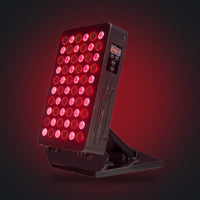
Heat needs somewhere to go. For the FX500, which has a foldable stand, make sure the stand is fully open and the panel has open air around it. For the FX300, which hangs from a hook, keep it clear of curtains and make sure the hook and rope are secure. A new rise in noise from the cooling is itself worth noticing.
Electrical side of heat
Heat in a cord or plug is a different thing from heat in the housing. OSHA lists improper use of extension and flexible cords among the most frequent causes of electrical injuries. That page is about workplaces, but the lesson carries over. A cord that feels hot, a plug that wobbles in the outlet or a power strip carrying a heater as well is a reason to stop and fix the setup. Our guide on electrical safety for panels covers outlets, cords and surge protection in more detail.
Reporting a problem
If a device overheats, we would like to know. Contact us with your order details. The FDA also explains how consumers can report a device problem through its MedWatch program, which is a voluntary reporting route for consumers.
Common mistakes
- Writing off a hot smell as a quirk and using the panel again the next day.
- Covering the panel with a towel to block the light from a partner or pet.
- Running several long sessions back to back with no rest.
- Pushing the panel against a wall or a curtain.
- Plugging a panel into a strip that also runs a space heater.
- Assuming a working fan means nothing is wrong.
- Opening the housing to look inside. Do not do this.
Before you use any light device: read the label, follow the device manual, and use eye protection as directed. Speak to a qualified professional before use if you have any medical question, take medications, are pregnant, or have light sensitivity.
Related guides in this series
- The full safety guide
- Why cheap panels lose power over time
- Using a device beyond its manual
- AWA FX500 review
- A buyer's checklist for home devices
Device pages
Read the full page and label for each device before you use it: AWA FX300 panel, AWA FX500 panel. You can also browse AWA panels.
Frequently asked questions
Is it normal for a red light panel to feel warm?
A gently warm housing is normal because the device turns part of its electricity into heat. Too hot to hold your hand on, or any burning smell, is not normal.
What should I do if my panel smells hot?
Stop, switch it off, unplug it if that is safe, and let it cool. If you smell burning or see smoke, leave the area and regard it as an emergency.
My panel switched itself off during a session. Is that a fault?
It may be a protection feature or a fault. Check vents, placement and the outlet, let it cool, and contact support if it happens again.
Can I use a fan to cool the panel?
Open air around the housing helps. Do not block the panel or its vents, and do not use any method that gets liquid on it.
How do I report a problem?
Contact us first. The FDA also explains how consumers can report device problems through MedWatch.
Sources
- OSHA: Electrical safety overview. A workplace page that lists improper use of extension and flexible cords among the most frequent causes of electrical injuries. We cite it for general electrical practice, not for any home product.
- FDA: How to report a medical device problem. Explains that consumers can report a device problem through MedWatch, the FDA voluntary safety reporting program, online or by mail or fax.
Regulatory note: select devices carry FDA 510(k) clearance for specific, limited uses; most are sold as general wellness products. Read each product page and label.
How we create this guide
AWA sells red light therapy devices. We write these guides to explain how devices work and how to choose, use and look after one. This is general information, not medical advice. Read each product page and label. See our editorial standards.